In case of outages, turn off the video
If video/audio quality issues arise, turn off video – when connected to a lower quality network, the bandwidth requirements for video can cause problems, which are best remedied by temporarily not using video at this time. As long as all participants are connected via a good quality computer network, there should be no problem using video.
Turn off custom video

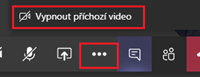
Turning off incoming video
Connect via cable
If you have the option to be connected via cable, take it.
Turn off the microphone
If you are not speaking, turn off your microphone. The microphone also picks up various noises that degrade the sound quality for others (tapping on the keyboard, the sound of a computer fan, putting down a cup…).

Let me make the arrangements
In an online call, you cannot perceive the body language, the intention of another to speak, the sound quality is worse when there are multiple speakers. It is advisable to wait until the current speaker has finished to start the call and slow down the communication overall.
Use moderated discussion
- Select a moderator to assign the floor.
- The moderator will display the list of participants in the call.
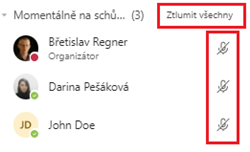
- Everyone mute your microphones (see below), or the moderator can mute them for everyone.
- Anyone who wants to talk can unmute their microphone. The moderator sees this and gives the floor after the previous participant has stopped speaking.
- Anyone who ends their contribution will turn down their microphone.
View the list of online participants.

Mass microphone muting.