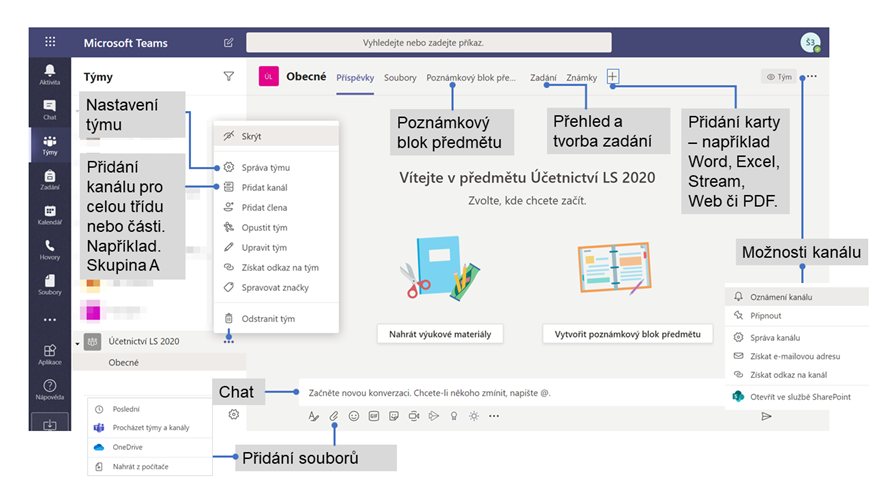
Class / Subject in MS Teams
A team space prepared for interactive learning needs, behind which is the Office 365 group with MS Teams. The difference of the team space “class” compared to other types of teams is in the form of a Subject Notebook, Assignment. When students need to be divided into seminar groups, team channels can be used. The instructor can organize a meeting where students join and the instructor presents, for example, their desktop, application window or draws on the whiteboard. The basis of all groups is working with documents, hence the easy distribution of learning materials to students.
A team called a class includes:
- Subject notebook
- Assignment – space for submitting documents or completing a test
- The Conversation
- Files
- Video and voice calls – desktop, presentation or whiteboard sharing
- Chat (if enabled)
- Pin a new tab with documents or sites like Microsoft Forms
What the team can be used for:
- Assignment, monitoring and control of student work
- Export evaluation
- Collaboration and communication in the classroom
- Creating notifications
- Entering quizzes and voting
- Working in groups of students
- Sharing and organising rich content
- Inviting virtual experts into the classroom
Basic orientation in the class team