How to proceed with distance enrolment
Enrolment in studies takes place in the Application for Studies application:
https://is.jamu.cz/prihlaska/?op=e
Students who are previous users of IS JAMU and have created an application under their IS account, enter their application after logging in to IS JAMU:
https://is.jamu.cz/auth/prihlaska
In your e-application you will now find the earliest from 1. 7. a new “Enroll in Studio” button.
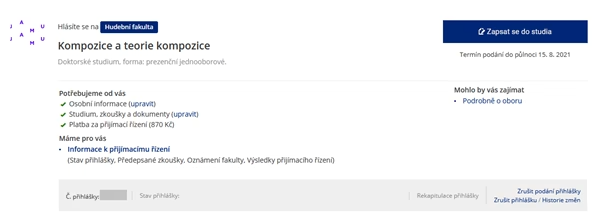
Clicking this button will take you to a new page where you must tick two confirmations:
- Consent to enrolment in the studio
- Confirmation of your control over the password
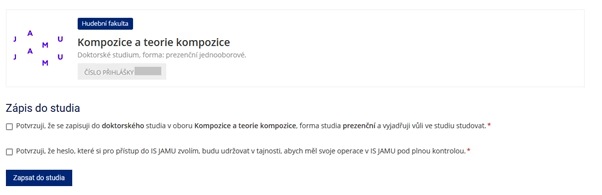
Once you have confirmed these fields and clicked on the “Enroll in studio” button, your enrollment will be confirmed on the next page
Students who already have an account from before can stop here, their enrollment is complete, they do not set a new password and are not affected by the person identification, the others continue:
Underneath the confirmation that reads “Enrolment has been successful” you will find one very important number – the person’s UČO (university number). Remember and note this number, it will accompany you throughout your studies at the Janáček Academy of Performing Arts. You will use it to log in to the JAMU Information System – the “Set password” button, which you will find just below the enrolment confirmation, will lead you there.

Clicking on the “Set Password” button will take you to a page where you can set your temporary password. If you have already studied at JAMU and have been assigned a UČO, you will log in with your current primary password.
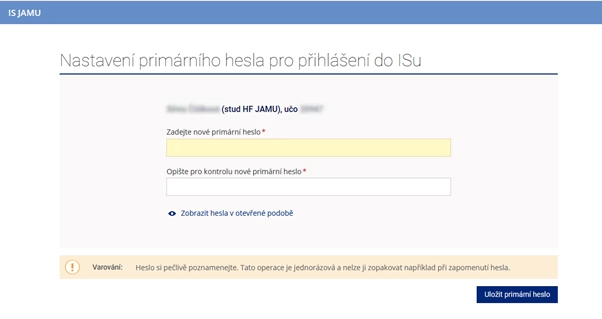
Make a careful note of the temporary password; this is a one-time operation and cannot be repeated or the temporary password reissued.
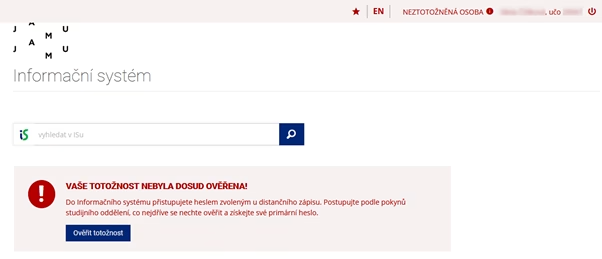
After setting your own password, you can log in to IS JAMU. For the time being, you will be in the “person not identified” status, which will be prominently displayed on each of your JAMU IS pages. Identification of persons in IS JAMU can be done either:
- Using online public administration services, i.e. via the Citizen Identity – at any time (New from the financial year 2024/25)
- In person at the Information Meeting (June, DF) , Study Readiness Course (September/October DF), Information Course ( September/October HF)
- In exceptional cases, it is possible to use the identification through sending a parcel in your own hands or a personal visit to the study department of the faculty – here you should make an appointment first, but please use this option only as the last one.
For more information, see the “Verify Identity” box for the relevant option.